How to Use Heading Tags (H1, H2, H3) for SEO
Learn how H1, H2, and H3 heading tags affect your SEO. Covers structure rules, keyword placement, common mistakes, and how to fix them fast.
Alex Carter
SEO Strategist · June 14, 2026
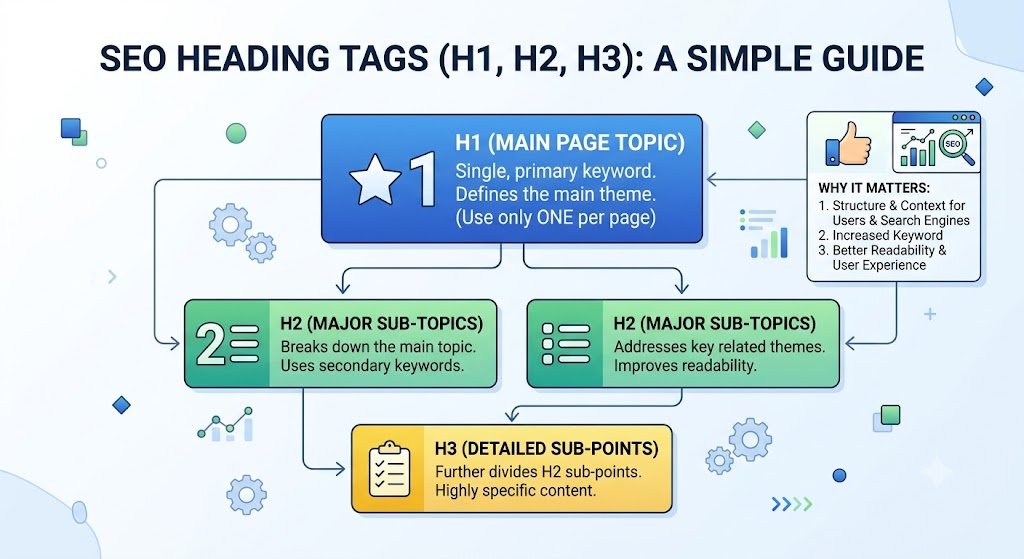
Heading tags are one of the most misunderstood elements of on-page SEO.
Some people ignore them entirely and write content as one long block of text. Others use them purely for visual styling — making text bigger or bolder — without thinking about structure. Both approaches leave ranking potential on the table.
Used correctly, heading tags for SEO do two important things: they tell Google what your content is about and how it's organised, and they make your content easier for readers to scan and absorb. This guide covers how to use H1, H2, and H3 tags properly — and what to stop doing.
What Are Heading Tags?
Heading tags are HTML elements that define the titles and subheadings within a page. They run from H1 (the most important) to H6 (the least), though in practice most content only uses H1 through H3.
They look like this in HTML:
<h1>Main Page Title</h1>
<h2>Major Section</h2>
<h3>Sub-point Within That Section</h3>
In your CMS or page editor, you apply them through a dropdown or toolbar — you don't need to write raw HTML.
Google reads heading tags to understand the structure and hierarchy of your content. They're essentially an outline of your page, signalling which topics are primary and which are secondary.
The H1: Your Page's Main Title
Every page should have exactly one H1. It's the top-level heading — the title of the page as the reader sees it.
Your H1 should:
✅ Include your primary keyword
✅ Accurately describe what the page covers
✅ Be unique across your site — no two pages should share the same H1
✅ Read naturally, not like a keyword list
Your H1 and your title tag don't have to be identical, but they should be closely related. The title tag is optimised for the search result; the H1 is for the reader who has already clicked through.
One H1 per page. That's the rule. For the full breakdown of why it matters, read: H1 Tag SEO: What It Is and Why Every Page Needs One.
H2s: Your Major Sections
H2 tags mark the main sections of your content. Think of them as the chapter titles of your article.
Every H2 should:
✅ Introduce a distinct section of the content
✅ Be relevant to the overall topic of the page
✅ Include a secondary keyword or related term where it fits naturally
✅ Help a reader who is scanning the page understand what each section covers
If someone reads only your H1 and your H2s, they should get a clear picture of what the entire article covers. That's a useful test — run it on your own content.
How many H2s you need depends on the length and complexity of the article. A 1,000-word piece might have 4–6 H2s. A 2,500-word guide might have 7–9. There's no fixed number — use as many sections as the content logically requires.
H3s: Sub-Points Within Sections
H3 tags sit beneath H2s and break a section into smaller points or steps.
Use H3s when:
👉 A section has multiple distinct sub-points that each need their own heading
👉 You're writing a step-by-step process where each step deserves a label
👉 A section is getting long and would benefit from internal structure
Don't use H3s just to add visual variety. Every heading should mark a genuine shift in the content — a new idea, a new step, a new point.
H3s rarely need keywords directly, but they should be descriptive. A reader scanning an H3 should understand immediately what that sub-section is about.
How Heading Tags Affect SEO
Google uses heading tags in several ways:
Topic understanding. Headings help Google parse what your page is about. The H1 signals the primary topic. H2s signal the subtopics. This helps Google match your content to a wider range of related search queries, not just your exact primary keyword.
Keyword signals. Including your primary keyword in the H1 and at least one H2 reinforces what the page is about. Secondary keywords in other H2s help you rank for related searches without writing separate pages.
Featured snippets. Google often pulls content from sections immediately following an H2 or H3 to populate featured snippets (the boxed answers at the top of search results). A well-structured heading followed by a clear, direct answer is one of the best ways to win snippet positions.
Crawl efficiency. Headings help Googlebot navigate and index your content more efficiently — particularly on longer pages where the structure matters more.
Common Heading Tag Mistakes to Avoid
❌ Using multiple H1s. One page, one H1. Using two or three H1s sends conflicting signals about what the page is primarily about. For a full discussion of this specific issue: Can You Have Multiple H1 Tags? What Google Says.
❌ Skipping heading levels. Going from H1 directly to H3 — skipping H2 entirely — breaks the logical hierarchy. It's not a catastrophic error, but it makes your content harder to parse for both Google and readers.
❌ Using headings for styling only. If you're making text bigger by applying an H2 tag rather than because it marks a new section, you're misusing the element. Style your text with CSS or font formatting, not heading tags.
❌ Keyword stuffing in headings. Loading every H2 with the same keyword looks unnatural and is a flag for low-quality content. Use keywords where they fit. Write headings that serve the reader first.
❌ No headings at all. A wall of text with only an H1 at the top gives Google very little structural information to work with. Use H2s to break content into logical sections — even on shorter pages.
A Simple Heading Structure to Follow
Here's what a well-structured 1,000-word article looks like:
👉 H1: Primary keyword — main topic of the page
👉 H2: What the topic is / definition
👉 H2: Why it matters
👉 H2: How to do it (main section)
👉 H3: Step 1
👉 H3: Step 2
👉 H3: Step 3
👉 H2: Common mistakes
👉 H2: Summary or next steps
That structure works for almost any informational article. It's logical, scannable, and gives Google a clear outline to work with.
Check Your Heading Structure Before Publishing
Once your content is written, it's worth running a quick check to make sure your heading hierarchy is correct — especially if you're working in a CMS where heading levels are easy to misapply by accident.
Rankivo's SEO Score Checker audits your heading structure alongside all other on-page elements — flagging missing H1s, duplicate headings, skipped levels, and keyword gaps in one pass.
For everything else that goes into a fully optimised page, the On-Page SEO for Beginners: The Complete 2026 Guide covers every element step by step.
And if you're still working on the building blocks — title tags and meta descriptions — read our other articles in this series.
This Article Is Part of Our On-Page SEO Series
📚 Explore the full Keyword Research Series
Start here:
Pillar article:
👉 On-Page SEO for Beginners: The Complete 2026 Guide
Other articles in this series:
Explore the full series to go deeper on any topic.
Frequently Asked Questions
Do heading tags directly affect Google rankings?
Yes — they're a confirmed on-page ranking signal. Google uses headings to understand your page's topic and structure. Including your primary keyword in the H1 and at least one H2 reinforces what the page is about and helps it rank for related searches.
Should every page have an H1?
Yes, every page. Your H1 is the primary signal to Google about what the page covers. A page without an H1 is like a document without a title — Google has to work harder to figure out what it's about, and it may rank lower as a result.
Can I use H2s without H3s?
Absolutely. H3s are only needed when a section has multiple sub-points that benefit from their own labels. Short sections, simple points, and single-step explanations don't need H3s. Use them when the content calls for them, not as a default.
Does it matter what order heading tags appear in?
Yes. The hierarchy should flow logically: H1 first, then H2s, then H3s under the relevant H2s. Jumping from H1 to H3 — or using an H2 after an H3 when it belongs to a new major section — breaks the structure and makes the page harder to parse.
How many times should I use my keyword in headings?
Once in the H1 is essential. Once in an H2 is strongly recommended. Beyond that, use it only where it fits naturally. Keyword-stuffed headings are a quality signal in the wrong direction.
Check your heading structure alongside every other on-page element with Rankivo's free SEO Score Checker — or start your full SEO setup at rankivo.co.
Written by
Alex Carter
SEO Strategist
Alex has spent 8+ years helping brands dominate search rankings. Specializes in technical SEO, keyword strategy, and content systems that drive compounding organic traffic.
Ready to create content like this?
Use RANKIVO to generate SEO-optimized content in seconds. Start free today.
Start Free — No Credit Card