How to Write the Perfect SEO Title Tag (With Examples)
Learn how to write SEO title tags that rank and get clicks. Includes rules, real examples, and a free tool to check your tags instantly.
Sarah Malik
Content & Keyword Expert · June 11, 2026
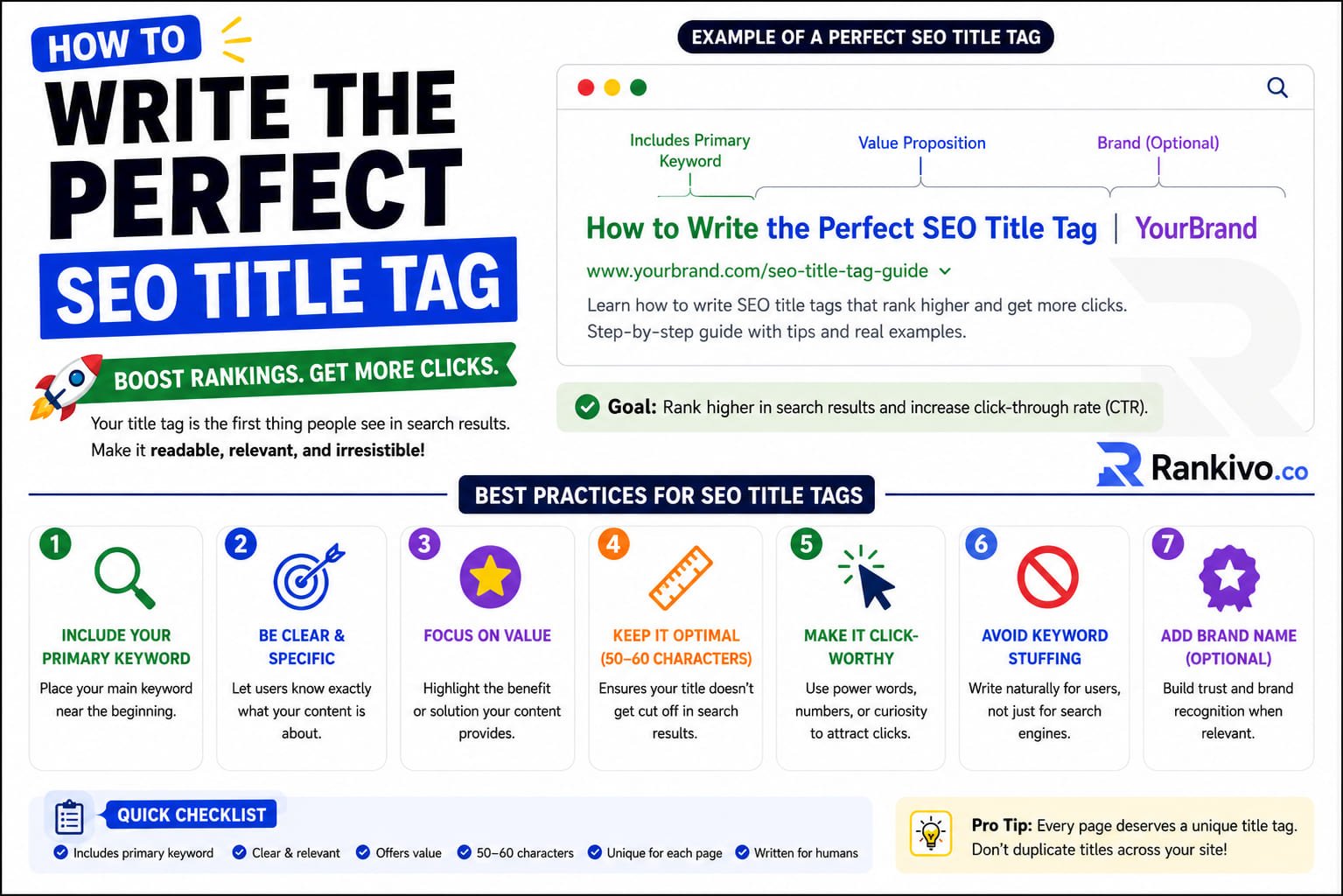
Your title tag is the first thing Google and your reader see.
Get it right, and you rank higher and earn the click. Get it wrong, and even a well-written article stays buried. Learning how to write an SEO title tag is one of the highest-leverage skills in on-page SEO — and most people treat it as an afterthought.
This guide covers what makes a title tag work, what kills it, and how to write one that performs.
What Is an SEO Title Tag?
The title tag is an HTML element that specifies the title of a page. It appears in three places:
👉 The browser tab when someone opens your page
👉 The clickable headline in Google search results (the blue link)
👉 When someone shares your URL on social media
It looks like this in your HTML:
<title>How to Write the Perfect SEO Title Tag (With Examples)</title>Google uses your title tag to understand what your page is about. It also heavily influences whether a searcher clicks your result over the ones next to it.
Why Title Tags Matter More Than Most People Think
Title tags are a confirmed on-page ranking factor. They tell Google the topic of your page, which affects which searches you appear for.
But ranking is only half the job.
Your title tag also determines your click-through rate — the percentage of people who see your result and actually click it. A higher CTR sends positive signals back to Google, which can push your ranking up further. A weak title tag costs you traffic even if you're on page one.
Most pages don't lose to better content. They lose to better titles.
The Rules for Writing a Strong SEO Title Tag
1. Keep It Between 50 and 60 Characters
Google cuts off title tags that are too long, usually replacing the end with an ellipsis (…). This makes your title look incomplete and hurts click-through rates.
The safe zone is 50–60 characters including spaces.
Too short (under 40 characters) is a missed opportunity — you have room to add more context and a keyword.
Too long (over 65 characters) and Google may rewrite it entirely, which you don't want.
If you're unsure whether your title fits, Rankivo's Meta Tags Generator shows you a live character count and a preview of how your title looks in search results before you publish.
2. Put Your Primary Keyword Near the Front
Google gives more weight to words at the beginning of the title tag. So does the human eye — readers scan left to right and make snap decisions.
❌ Weak: "A Beginner's Guide to Writing Better SEO Titles for Your Blog"
✅ Stronger: "SEO Title Tags: A Beginner's Guide to Writing Ones That Rank"
Your primary keyword doesn't have to be the very first word, but it should appear in the first half of the title.
3. Match Search Intent
If someone searches "how to write an SEO title tag," they want a how-to guide — not a definition, not a product page, not a list of tools.
Your title should signal the format and depth of your content.
👉 How-to intent → use "How to" at the start
👉 List intent → lead with a number ("7 Rules for…")
👉 Comparison intent → include "vs" or "compared"
Mismatching intent is one of the fastest ways to tank your CTR, even if your keyword placement is perfect.
4. Write for Humans, Not Just Algorithms
A title that's stuffed with keywords reads like spam.
❌ Bad: "SEO Title Tag SEO Best Practices Title Tag Writing 2026"
✅ Good: "How to Write the Perfect SEO Title Tag (With Examples)"
The second title has the keyword, signals what the reader will get (examples), and reads naturally. That's the combination you want.
5. Add Power Words That Drive Clicks
Certain words increase click-through rate because they create curiosity or promise value:
👉 Complete, Ultimate, Proven
👉 Step-by-Step, Beginner's Guide
👉 With Examples, Free, Fast
👉 What, Why, How
These aren't tricks — they work because they tell the reader exactly what they're getting.
6. Include the Year When Relevance Matters
For topics where freshness matters, adding the year signals your content is current.
"On-Page SEO Best Practices (2026)" outperforms a dateless version when people are specifically looking for up-to-date information.
Don't force it on evergreen topics where the year adds nothing.
What to Avoid
These are the most common title tag mistakes:
❌ Using your brand name instead of your keyword. Unless you're a known brand, your company name at the front wastes valuable space. Put the keyword first.
❌ Duplicate title tags. Every page on your site should have a unique title. If two pages share the same title, Google has trouble distinguishing them.
❌ Vague titles that don't communicate the topic. "Welcome to Our Blog" or "Home" tell Google and the reader nothing.
❌ Writing for Google only. A title that's technically optimised but reads like a robot wrote it won't get clicked. Both matter.
A Quick Title Tag Formula That Works
[Primary Keyword]: [Benefit or Hook] ([Supporting Detail])
Examples:
✅ How to Write SEO Title Tags: 6 Rules That Actually Work
✅ Meta Description Best Practices: What Google Wants in 2026
✅ Heading Tags for SEO: How H1, H2, and H3 Affect Rankings
This structure gets the keyword in early, tells the reader what they'll get, and stays within character limits.
Check Your Title Tags Before Publishing
Writing a good title tag takes about two minutes once you know the rules. But most people write one, publish, and never look at it again.
A better approach: write the title, run it through a tool, see how it looks in a real search result preview, and adjust if needed.
Rankivo's Meta Tags Generator does exactly this — enter your target keyword, and it generates SEO-optimised title tags you can use directly, with a live preview of how they appear in Google. When you're ready to check the full on-page health of your content, the SEO Score Checker flags title tag issues alongside all your other on-page elements.
For a broader look at how title tags fit into everything else you should be optimising, see the On-Page SEO for Beginners: The Complete 2026 Guide.
This Article Is Part of Our On-Page SEO Series
📚 Explore the full Keyword Research Series
Start here:
Pillar article:
👉 On-Page SEO for Beginners: The Complete 2026 Guide
Other articles in this series:
How to Write the Perfect SEO Title Tag (With Examples)← You are here
Explore the full series to go deeper on any topic.
Frequently Asked Questions
What is the ideal length for an SEO title tag?
Between 50 and 60 characters. Shorter is fine if the title is complete. Anything over 65 characters risks being cut off or rewritten by Google.
Does the title tag have to match the H1?
No. They should be similar, but they don't have to be identical. Your H1 can be slightly longer or more descriptive. Your title tag should be optimised for the search result, your H1 for the reader on the page.
Can Google change my title tag?
Yes. Google rewrites title tags it considers misleading, keyword-stuffed, or too long. The best way to stop it is to write a clear, accurate, well-length title in the first place.
Should I put my brand name in the title tag?
It depends. For your homepage, yes. For blog posts and landing pages, put the keyword first and only add your brand name at the end if you have room — and only if brand recognition helps your CTR.
How often should I update title tags?
Review them whenever your content is significantly updated, or if a page is underperforming in search. A title tag change alone has moved pages from page 2 to page 1 for many publishers.
Ready to generate title tags that rank? Try Rankivo's free Meta Tags Generator — or start your full SEO toolkit at rankivo.co.
Written by
Sarah Malik
Content & Keyword Expert
Sarah blends data-driven keyword research with compelling storytelling. She helps SaaS brands build topical authority through content that ranks and converts.
Ready to create content like this?
Use RANKIVO to generate SEO-optimized content in seconds. Start free today.
Start Free — No Credit Card